How to Use a GPX File with Apple CarPlay
CarPlay cannot open a GPX on its own — there is no file manager on the car screen and no way to import anything there. The work happens on the iPhone: you load the Track, you make sure the map is downloaded, and then the car simply shows what the phone is already navigating. Ten minutes at home, nothing to fiddle with at the fuel stop.
Step 1 — Load the Track on the iPhone, before you drive
Import the .gpx into a CarPlay-capable navigation app and check it on the map: right start, right direction, no missing chunk in the middle. If you don't have the file in yet, the step-by-step is in opening a GPX on iPhone; Tracks that came from Wikiloc have their own guide.
Step 2 — Download the map for where you're going
Do this on Wi-Fi, not on the road. Once the offline map is on the phone, the car screen keeps drawing the map and the Track with no coverage at all — CarPlay is a display, so whatever the phone can do without a signal, the car shows. One exception: satellite imagery streams and cannot be stored, so it goes blank off-grid on both screens. See offline GPX navigation.
Step 3 — Connect and open the app on the car screen
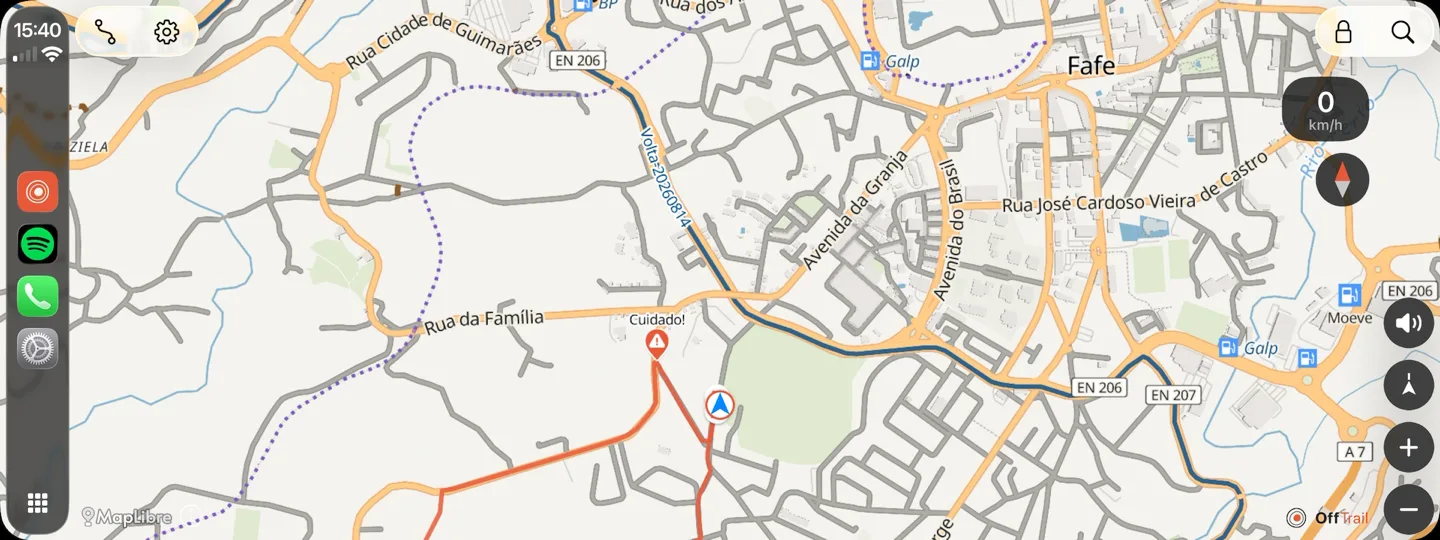
Plug in, or connect wirelessly if the car supports it. A CarPlay-capable app appears on the car's home screen by itself — there is nothing to install on the vehicle. Open OffTrail there and the map, your position and the guidance for the loaded Track fill the dashboard display.
What the car screen actually shows
The same thing the phone shows, sized for a dashboard: the offline map with your Track drawn on it, your live position with course-up following, and the guidance for whatever is loaded — an imported GPX, an off-road route, an on-road route, or a Round Trip. Drifting off the line raises the same Off Track warning with the distance back and a dashed connector, and riding the Track backwards raises the same Wrong way warning. There is no cut-down "car mode" with fewer features.
The next bend is called out on the car screen and out loud too — direction, how sharp, distance — for an imported Track as much as for a generated route. Street names are the one thing missing: the turns are read off the shape of the line.
The limits worth knowing before you set off
Importing and route generation stay on the phone. Deliberately: the car interface is for driving, not for file management.
The iPhone does the work. CarPlay is the display layer, so the phone has to stay connected, awake enough to navigate, and ideally powered — a lit screen plus a GPS fix drains a battery fast.
Satellite imagery needs a connection, on the car screen as much as on the phone. The vector map is the one that works offline.
Generating a new route needs a connection too, because the computation runs on a server. Build it before you lose signal, then follow it offline.
On Android the equivalent is Android Auto, with the same map, garage and guidance. What the CarPlay screen offers, and which cars and phones it works with, is on the CarPlay GPX navigation page. Still choosing a screen for a motorcycle? See choosing a motorcycle navigation setup and the devices we've tested.
OffTrail is free on the App Store. No account, and CarPlay is part of the app — there is no paid tier.
Frequently asked questions
Can I import a GPX file directly on the CarPlay screen?
No. There is no file access on the car screen. Import the Track on the iPhone before you drive; the car then shows it.
Can Apple Maps follow a GPX on CarPlay?
Apple Maps has no GPX import, so following a Track on CarPlay is done through a GPX-capable navigation app such as OffTrail.
Does CarPlay GPX navigation work without coverage?
Yes, if the Track and the offline map are already on the iPhone. CarPlay only displays what the phone is navigating. Satellite imagery is the exception — it streams.
Do I need to install anything in the car?
No. A CarPlay-capable app appears on the car's home screen once the iPhone is connected.
Is the car screen missing features compared with the phone?
Not for navigation: same map, same track line, same off-track and wrong-way warnings. Importing files and generating routes stay on the phone on purpose.
Is CarPlay navigation available on Android?
CarPlay is Apple's platform. On Android, OffTrail offers the same experience through Android Auto.