How to Download a GPX from Wikiloc
Wikiloc is where a lot of good off-road tracks live. Getting one onto your phone is two steps: download the .gpx from the trail page, then open that file with a navigation app that can follow it. Below is the exact sequence, plus the fix for the part that trips people up — the app not showing in the share menu.
Step 1 — Download the GPX from the Wikiloc website
1. Open the trail page on wikiloc.com.
2. Press Download, top right of the trail page.
3. Choose File.
4. Format: .gpx (the other option, .tcx, is for training devices).
5. Quality: pick the original trail. The 500-point options exist for old GPS units with tiny memories; a phone handles the full Track, and simplifying it cuts corners off switchbacks.
6. Tick waypoints if the trail has them and you want them too.
7. Save the file.
Source: Wikiloc Help, How to download trails from the Web — checked 7 September 2026. Wikiloc's own account and plan rules apply and can change; if an option is missing on your account, that is a Wikiloc question, not an OffTrail one.
Straight from the Wikiloc app
You do not need a computer. In the Wikiloc app, open the trail, tap Send to your GPS and then Send Trail as File — the app converts the trail and hands you a normal file to save or share. On Android you may need a file manager to choose where it lands. (Source: Wikiloc Help, Export trails from the App — checked 7 September 2026.)
Step 2 — Open the GPX in OffTrail
iPhone: open Files, find the .gpx (Downloads, if Safari saved it), tap it or use Share → OffTrail. AirDrop from a Mac or another iPhone works the same way — pick OffTrail when the file arrives.
Android: tap the file in Files / My Files (or in the browser's download notification) and choose OffTrail. From another app, Share → OffTrail works too.
The Track lands in your library and draws on the map. OffTrail keeps up to five Tracks loaded at once, each in its own colour, and it never redraws or recalculates the line you brought — the tour you downloaded is the tour you ride.
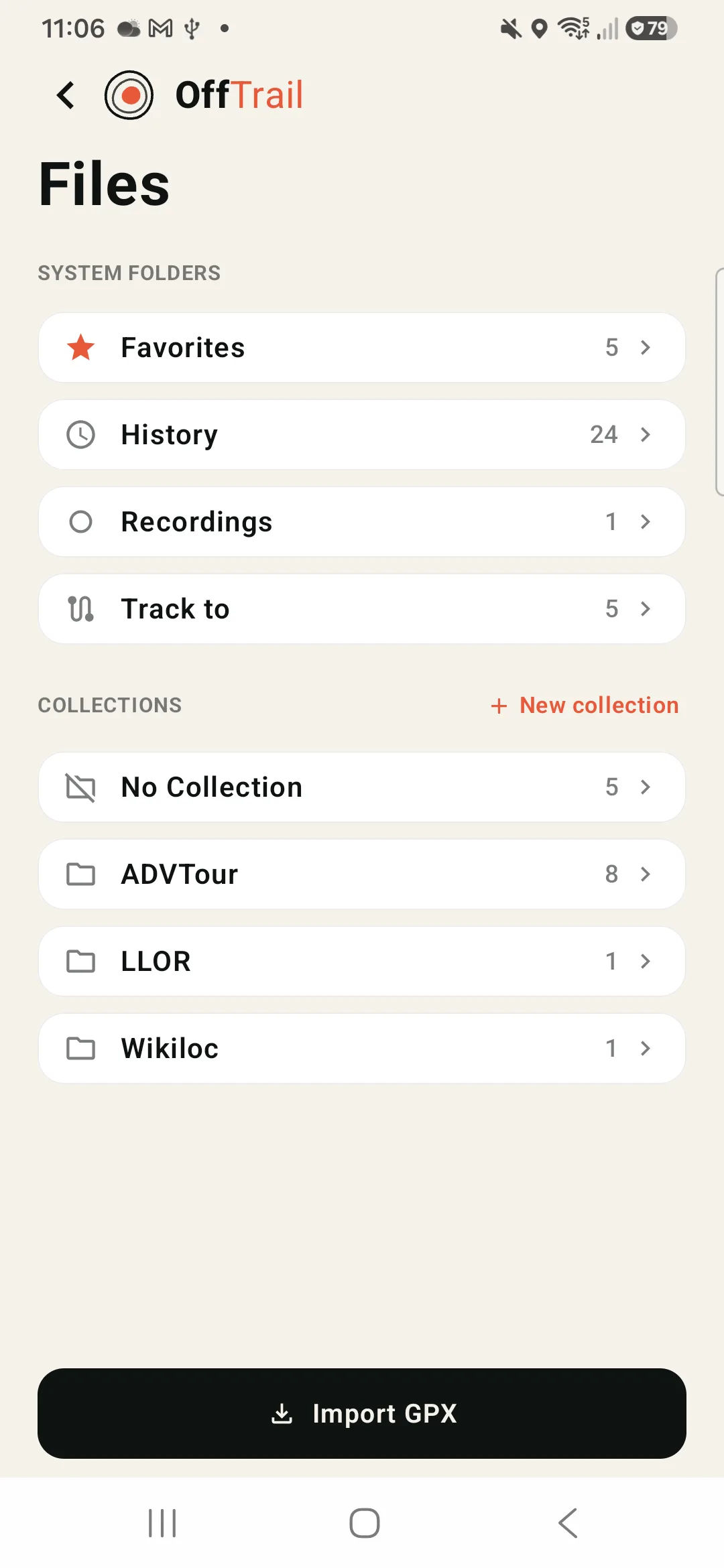
If OffTrail doesn't appear in the share menu
Almost always the same cause: the app that is sharing the file did not say it is a GPX. Fixes that work:
Save the file first, then open it from the file manager. Downloading from a browser, WhatsApp or an email attachment often hands the next app an unnamed, typeless blob. Once the file is sitting in Files / My Files with a .gpx name it usually works — though on Android it depends on the file manager passing the name and type along.
Or skip the share sheet entirely. Open OffTrail, go to Files and tap Import GPX. On Android the picker accepts any file, whatever type it claims to be. On iPhone it lists files named .gpx — which is what saving to Files gives you, so do that first and the file will be there.
On iPhone, scroll the app row. The share sheet shows a handful of apps and hides the rest behind More. OffTrail registers as an alternate handler for GPX, so it is in the list even when it is not the first icon.
On Android, use Open with instead of the default. If another app has claimed .gpx, long-press the file and pick Open with → OffTrail.
Check the file really is a GPX. A .tcx or .kml download will not import; go back and pick the .gpx format.
Before you ride: download the map
A Wikiloc trail usually goes somewhere with no coverage — that is the point of it. Download the offline map for the country before you leave and the Track, the map, your position and the off-track warnings all keep working with the phone in airplane mode. See offline GPX navigation for exactly what stays available, and opening a GPX on iPhone or on Android for the platform detail.
OffTrail is free on the App Store and Google Play. No account.
Frequently asked questions
Which Wikiloc download option should I choose?
File → .gpx → the original trail. The simplified 500-point options exist for old GPS devices; a phone handles the full Track, and simplifying rounds off tight switchbacks.
Do Wikiloc waypoints come across?
Yes, if you tick Wikiloc's option to include the waypoints marked on the map when you download the file.
Why doesn't OffTrail show up when I share the file?
Usually because the sharing app sent the file without a name or with a generic type. Save it to Files / My Files first and open the .gpx from there; on Android whether that is enough depends on the file manager. On iPhone, also check behind More in the share sheet. If it still doesn't appear, open OffTrail and use Files → Import GPX — on Android that picker takes any file, and on iPhone it takes anything saved with a .gpx name.
Can I open a Wikiloc GPX in OffTrail on Android?
Yes. Tap the downloaded file in Files / My Files and choose OffTrail, or share it to OffTrail from any app.
Does OffTrail change the Wikiloc Track?
No. OffTrail follows the exact geometry you imported. There is no rerouting engine that could decide another road is faster.