Tested with OffTrail.
Screens and handlebar controllers we ride with ourselves. Real-world tests, setup details and the limitations worth knowing before you buy.
Compatible — works through CarPlay, Android Auto or a compatible protocol. · Tested by OffTrail — a model we ride with, results and limitations documented. · Certified — ships with a built-in, tested OffTrail profile.
📱 New to riding with navigation? Read the Motorcycle Navigation Setup Guide →
Tested hardware
Devices we actually bought and ride with — tested with OffTrail on-road and off-road, limitations included. Learn more about OffTrail on Android Auto.
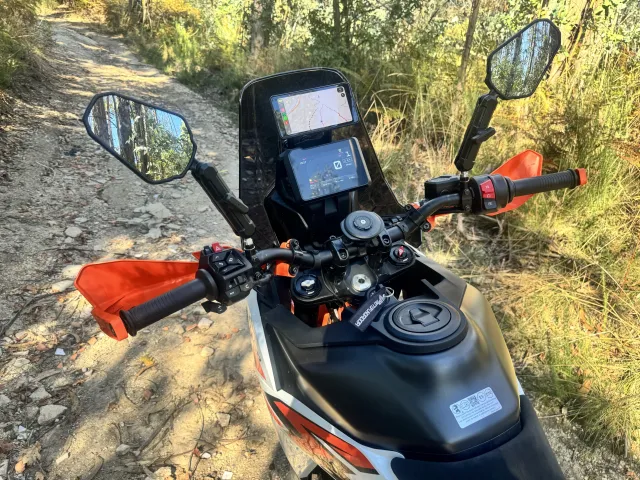
grandnavi M630 Pro 6.5" Wireless CarPlay / Android Auto Display Tested by OffTrail
A sharper, better-built 6.5-inch IPS screen — the one we stepped up to after our budget unit. Tested with OffTrail, 600 km off-road and counting.
6.5″ IPS · No ghost touches in our first 600 km · Reflections in direct sunlight.
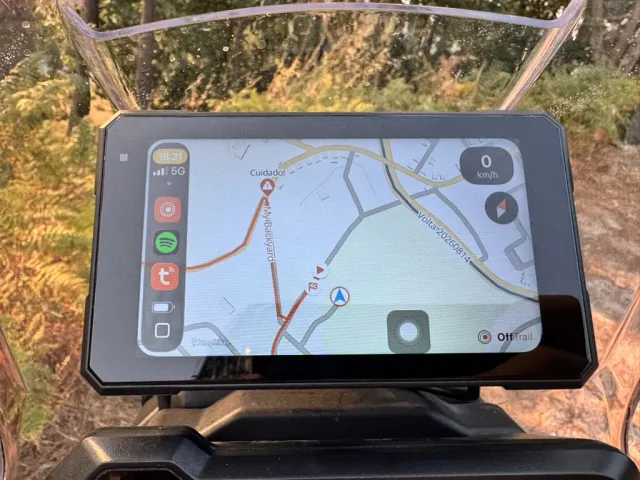
EKIY 5" Wireless CarPlay / Android Auto Display Tested by OffTrail
A surprisingly capable budget CarPlay and Android Auto screen — the one we started with. Tested on-road and off-road with OffTrail, limitations included.
5″ budget display · Ghost touches developed over time · Auto Lock helps during navigation.
Handlebar controllers
Pair, then ride
Set the controller to the mode specified below, then pair it in your phone's Bluetooth settings. OffTrail picks it up automatically — there's nothing to wire up in the app. Open Settings → Controllers to see the active profile.
Certified vs generic
A certified controller ships with a built-in, tested profile — its buttons map to the right map actions out of the box (shown in-app), on iOS and Android. Many other Bluetooth HID controllers can also work through the generic profile, where you map each button to an action yourself; exact keys and behaviour vary by model.
ARN Rally — ARN Remote LITE Certified
A handlebar remote with a built-in OffTrail profile. Set it to Navigation mode and Configuration 2 and it controls map up/down/left/right, recentre, orient and Zoom in / Zoom out. The full setup is shown inside the app under Settings → Controllers.
CarPlay & Android Auto screens
Already have CarPlay or Android Auto?
You can use OffTrail on a compatible CarPlay or Android Auto display through your phone — the live map, your garage, search and turn-by-turn guidance. See the screens we've tested ourselves above.
What "Tested by OffTrail" means
Aftermarket and motorcycle screens vary — in sunlight legibility, wireless stability, and how they handle day and night. A screen marked Tested by OffTrail is one we ride with ourselves: connected wirelessly, tested off-road in real sun and real dust, with the results and limitations written up.
The first screens are on the road with us right now — see our field tests of the grandnavi M630 Pro and the EKIY 5" above.
Your phone. Your screen. Your next ride.
Get OffTrail for iPhone or Android and ride with any of these.


New to the car screen? Read the Motorcycle Navigation Setup Guide.
Manufacturers
Get your device tested
Make a handlebar controller or a CarPlay / Android Auto display? Get in touch about compatibility testing and a documented listing.